
Mobile Technical Documentation—Multimedia, Multilingual, and Device-Independent
Today, technical documentation and e-learning content can be published in a multimedia format, in multiple languages, across different devices, and on mobile platforms. Customers now expect these features in both internal and external corporate communications as well. In this context, multimedia documentation and e-learning can reduce costs, minimize the potential for errors, and make complex information easier to understand.
Whether it's apps that demonstrate how to use a product, multilingual instructional videos on YouTube, repair guides using augmented reality, or training environments using virtual reality—many industries are already making extensive use of multimedia applications.
While paper documentation still predominates in some industries, there are certain scenarios in which multimedia instructions are already being used and make sense.
This seminar provides a practical overview of existing options for multimedia, multilingual, device-independent, and mobile information delivery.
Benefits for You
- You will learn to identify information that is suitable for mobile, multilingual, multimedia documentation or e-learning.
- After this seminar, you will be able to select media or combinations of media that are pedagogically appropriate.
- You will develop the ability to estimate the development and deployment costs of multimedia applications.
- After completing the seminar, you will be able to select, create, convert, and export appropriate media formats.
- You'll learn how to plan multimedia projects.
- You will learn which tools are suitable for creating multimedia applications and practice using them.
- You create simple interactive elements on your own.
- They further develop the provided templates for their own multimedia applications.
- You decide when it makes sense to use your own apps and which app-development tools to use.
- You'll build a simple hybrid app on your own.
- Participation in this continuing education event can also count toward tekom recertification.
Target Audience
- Employees and managers from the departments of Technical Documentation and E-Learning, Training, Operations, Service, Maintenance, and Installation
- Recommended prior knowledge: Basics of documentation creation, media design, and project planning. Basic knowledge of XML and HTML
Speaker
The speaker is a professor of Internet and media technology and focuses on multilingual, multimedia, interactive learning applications for the web and mobile devices, as well as on the creation of the media required for these applications. His research covers the fields of e-learning, augmented reality, and virtual reality.
Contents
Today, there is a wide range of media available for delivering information through multimedia, whether for technical documentation or e-learning. When selected and combined strategically, these media offer both educational and economic benefits. To achieve this, source data must be properly selected and generated or converted into the appropriate formats.
- The Media Portfolio for Technical Documentation and E-Learning
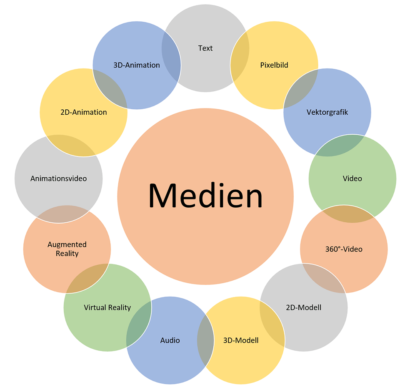
Media Portfolio for Technical Documentation and E-Learning
- Practical Examples – Mobile, Multilingual MultimediaDocumentation(MMMD)
- Practical Examples – Mobile, Multilingual, Multimedia E-Learning(MMME)
- Real-World Examples – Cost Reduction Through MMMD and MMME – A Method for Cost Comparison
- Identifying information suitable for multimedia presentation—the Text-to-Visualization method
- Fundamentals of Learning Theory and Pedagogy
- Evaluating the Effectiveness of MMMD and MMME – A Contrastive Usability Test
- Planning Resources for MMMD and MMME Projects – The ADDIE Model and Instructional Design

Interactivity in multimedia documents and e-learning courses can be either programmed—for example, using JavaScript—or created using software with a built-in programming interface, such as PDF, SVG, or Adobe Animate.
- Advantages and Disadvantages of Interactivity
- Interactivity Categories
- Production Costs
- An Introduction to JavaScript Programming
- Programming Simple Interactive Features with JavaScript
- Create Interactive Elements with Adobe Captivate Without Coding
2D and 3D animations and models can be easily generated from existing design data and integrated into technical documents and e-learning courses. When combined with other media and enhanced with interactive elements, they improve the transfer of information and enhance motivation to learn.
- Media combination: 2D or 3D model with text
- Media combination: 2D or 3D model with pixel or vector graphics or video
- Media combination: 2D animation with text
- Media combination: 3D animation with text or audio
- Media Formats – Source Data, Conversion Methods, Output Formats
- Production Processes and Tools – Adobe Animate for 2D animations, the browser-based 3D technologies WebGL and X3D, and Adobe Captivate for interactivity
- Development and deployment costs (web server, app store)
- Create interactivity; control media using keyframes and a timeline
Today, videos can be produced cost-effectively using smartphones and digital cameras. Animated videos can be created based on design data from 2D or 3D animations. When combined with other media and enhanced with interactive elements, these videos can be effectively used in technical documents and e-learning courses.
- Media combination: Video without sound
- Media combination: video with audio or subtitles
- Media combination: 2D and 3D animated video with sound, images, or text
- Media Formats – Source Data, Conversion Methods, Output Formats
- Production Processes and Tools – Multilingual videos using JavaScript and WebVTT based on the single-source principle; the open-source tool Blender for 3D animation and video rendering
- Development and deployment costs (web server, app store)
- Creating Interactive Hypervideos, Controlling Media with Keyframes and a Timeline – Hands-On Work with an Adobe Captivate Template
Augmented reality (AR) applications using smart glasses are used in technical documentation, particularly in the areas of repair, maintenance, and service. However, they can also serve as a cost-effective alternative to traditional text-and-image documents in e-learning.
- Real-World Examples of AR Applications in Technical Documentation and E-Learning
- Technology, Development Processes, and Tools—Explained Through Real-World Projects, Unity, and Vuforia
- Media Formats – Source Data, Conversion Methods, Output Formats
- Outlook: Integration of AR Data into CMS Systems and Its Combination with Industry 4.0
- Development and deployment costs (web server, app store)
Virtual reality (VR) applications are also put to good use in technical documentation, e-learning, and marketing. Whether it’s safety training for pilots in simulators, training for service technicians working on potentially explosive facilities, or a virtual tour of a plant complex, there are many practical applications for VR.
- Real-World Examples of VR Applications in Technical Documentation and E-Learning
- Technology, Development Processes, and Tools – Unity
- Media Formats – Source Data, Conversion Methods, Output Formats
- Development and deployment costs (web server, app store)
360° videos allow for a self-guided, panoramic view. This feature can also add value in technical documentation and e-learning. 360° videos can be enhanced with interactive elements that allow for targeted control of the viewer’s experience.
- Real-World Examples of 360° Videos in Technical Documentation and E-Learning
- Technology, Production Processes, and Tools – 360° Cameras, Editing Software
- Media Formats – Source Data, Conversion Methods, Output Formats
- Development and deployment costs (web server, app store)
- Create interactivity, control media using keyframes and a timeline – editing software
Multimedia content should be available in the target audiences’ respective languages, be as device-independent as possible, and be accessible on mobile devices. It should continue to be generated using common content management systems and follow the single-source principle. There are two options for achieving this: programming with HTML5 or developing apps.
- Publish multimedia content using apps—device-independent, mobile, and multilingual
- The Three Types of Apps: Web Apps, Hybrid Apps, and Native Apps—Possibilities and Limitations
- The Three APP Categories – Development and Deployment Costs
- Technology and Development Tools – Fundamentals of HTML5, JavaScript, CSS, and Frameworks; Fundamentals of Responsive Design; WebVTT or XML for Multilingual Support
Methods and Evidence
- The material covered is reinforced through practical exercises.
- They work on templates that can be reused when implementing multimedia applications within their own company.
- Participants will receive the speaker's presentation in electronic form before the seminar begins.
- Participants will receive a certificate of participation.